Plug in your servers.
We run the part that manages everything, kept up and upgraded. Add a server whichever way suits you: paste one command on it, let Meshploy connect with a key we give you, or have one created for you. Your apps and data stay on your machines.
Start on CloudInstall it on your own server.
All of Meshploy, Apache-2.0. Nothing held back, nothing sent to us. One command on a Linux server, then join more machines from the console.
sudo bash -c "$(curl -fsSL meshploy.com/install.sh)" # Install Meshploy on my serverpaste into Claude Code, Codex or your own agent Your machines, working as one.
- One private networkWherever they are, your machines reach each other privately. Nothing to open on them.
- They work as one computerPut an app on any machine, or let Meshploy pick one with room. Add a machine and there is more room.
- Every app has its own addressPublic with HTTPS, or private to your team. Many apps side by side on one machine.
- Each person reaches only their partGrant a person one app or one project. A client sees theirs and nothing else.
- A sealed box for code you do not trustA project can run its apps with a kernel of their own, so code that breaks out lands in the box.
Everything a product runs on.
Built in, not bolted on. One console, one CLI, one set of keys for your agents.
Deploy any way
Push to a git repo, point at a Docker image, drop a folder or start from a template.
Staging, then production
Levels for every stage. Promotion moves the exact build that was tested, never a rebuild.
Databases with backups
Postgres, MySQL, MariaDB, MongoDB, Redis or ClickHouse, backed up on a schedule to your storage.
Your domains, HTTPS on
Certificates are fetched and renewed for you. A level gets its own addresses on its own.
Private routes
Internal tools that answer only the people and machines you grant, never the internet.
Jobs on a schedule
Nightly reports, clean-ups and imports, with every run and its logs kept.
Logs, metrics, a terminal
See what an app prints, how hard each machine works, and open a shell when you must.
Settings in one place
Variables and secrets shared between services, encrypted at rest, borrowed by every level below.
Upgrades from the console
Meshploy upgrades itself when you say so, and tidies what the old version left behind.
Code you do not trust, boxed in.
Switch a project, or just its staging level, to the sealed box. Its apps get a kernel of their own, so code from an AI agent, a customer or a branch preview cannot reach the machine.
Access, person by person.
Grant someone one app, one project or the whole workspace. Projects are closed off from each other on the network unless you open them.
Moving from Dokploy or Coolify.
Meshploy reads what your server already runs, shows you the plan, and moves it across one app at a time. Your domains and certificates come with it, and nothing is down while it moves.
- ReadMeshploy lists the apps, databases, domains and volumes your server runs today.
- PlanYou see what each becomes in Meshploy before anything changes.
- Edge firstMeshploy starts answering your domains and passes traffic to the old apps as they are.
- One app at a timeEach app moves, with its data, and the edge switches to it. Undo is one step.
Open source, all of it.
The whole platform is Apache-2.0
No cut-down community edition. Enterprise only adds company features on top.
Cloud runs the same software
What we host for you is what you can install yourself.
Nothing sent to us
No telemetry. An install reads new releases and templates from public GitHub, and nothing about your servers or apps leaves them.
When your team needs more.
Enterprise is the same Workspace with what a company asks for. On Cloud it comes with the Business plan; on your own servers it is a licence you add.
- Sharing appsPeople sign in with a link and see only what is shared with them.
- TeamsGrant a team once; people's access follows them in and out.
- Your own brandYour name and logo on sign-in, doors and emails.
- Expiring access, requests, auditComing next.
- Company sign-inComing next.
The console, for real.
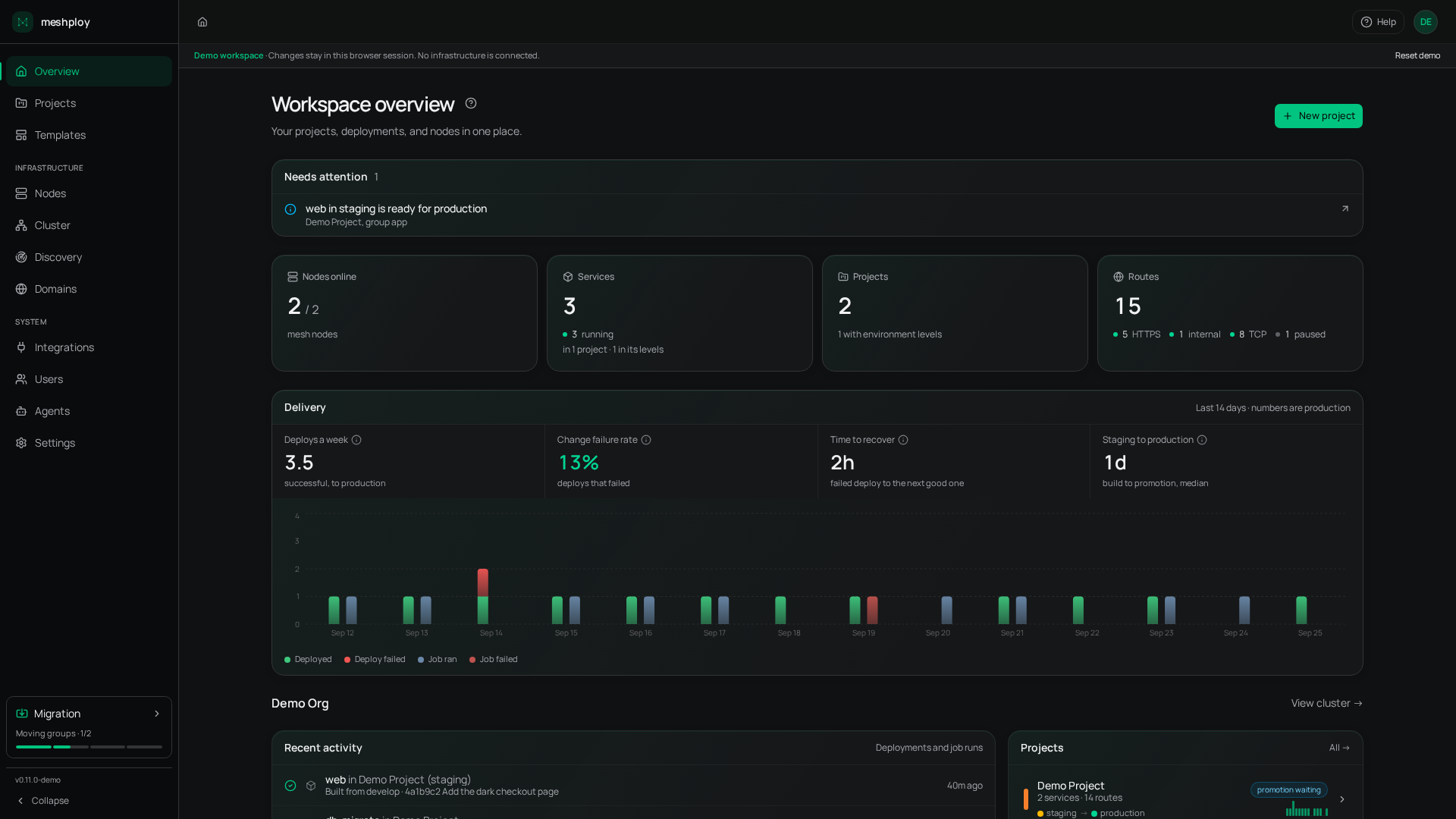
A sample workspace in your browser. Nothing is built and no servers are touched.
Your agent does the work.
Every action in the console is a tool your AI agent can use over MCP, limited to what its key allows: deploy, read logs, add a database, roll back.
agent › rolled shop back to 7c2e1f0 (deployed yesterday 18:04)
› it is serving again; the failing build is kept if you want to look
Or the command line.
One binary for machines and apps. Script it, run it in CI, or use it from your laptop.
› packed 212 files · 1.4 MB
› live at https://shop.acme.com
$ meshploy node list
› vps-frankfurt · online · 41%
› office-pune · online · 12%
The questions worth asking.
What machines can join?
Any machine that runs Linux can run apps: a VPS, a cloud server, the server in the office or an old PC at home. A Mac or a Windows laptop can join the private network to reach private apps.
Do my machines need public addresses?
Only the gateway, the machine that answers your domains, needs to be reachable. Every other machine can sit behind a router or a firewall; it reaches the others over the private network.
What is the difference between Cloud and self-hosting?
Self-hosting, you run all of Meshploy on your own server, free. On Meshploy Cloud, we run the part that manages everything, and your machines still run your apps.
What happens if a machine goes offline?
The rest keep serving. Apps without data of their own can start on another machine; the console tells you which apps are affected.
Can I move from Dokploy or Coolify?
Yes. Meshploy reads what the server runs and moves it across one app at a time, keeping your domains and certificates, with nothing down while it moves.
Does it run Kubernetes?
Underneath, yes: a lightweight Kubernetes spans your machines. You never have to touch it; the console, the CLI and your agent speak in apps, not pods.
Join your first machine today.
One command on your server, or start on Cloud and join machines later.